Case studiesReference integration: maintenance to ERP
OpexMX to SAP: confirmed delivery for every posting
How OpexFlow carries goods issues and work order confirmations from OpexMX to SAP so that each one is either confirmed by SAP or visible as an open item: accepted once, tallied on both sides, checked every night, and parked for a person when SAP refuses it.
Why delivery needs proof
Maintenance work creates ERP documents: spare parts issued to a work order, labour and cost confirmed when the order closes. Between two systems the costly failure is the silent one: a goods issue SAP refuses, or a confirmation that never lands, found only when stock or cost centres stop adding up.
An HTTP 200 on one call is not enough. The flow below gives three independent signals for every posting: the answer from SAP, a dead letter when SAP refuses, and a nightly comparison of what was sent against what SAP confirmed. The same pattern applies to any system pair, for example an MES posting to SAP.
The flow
OpexMX sends a signed webhook for each goods issue or work order confirmation. One flow in OpexFlow sits between OpexMX and the SAP middleware and does the following, in this order.
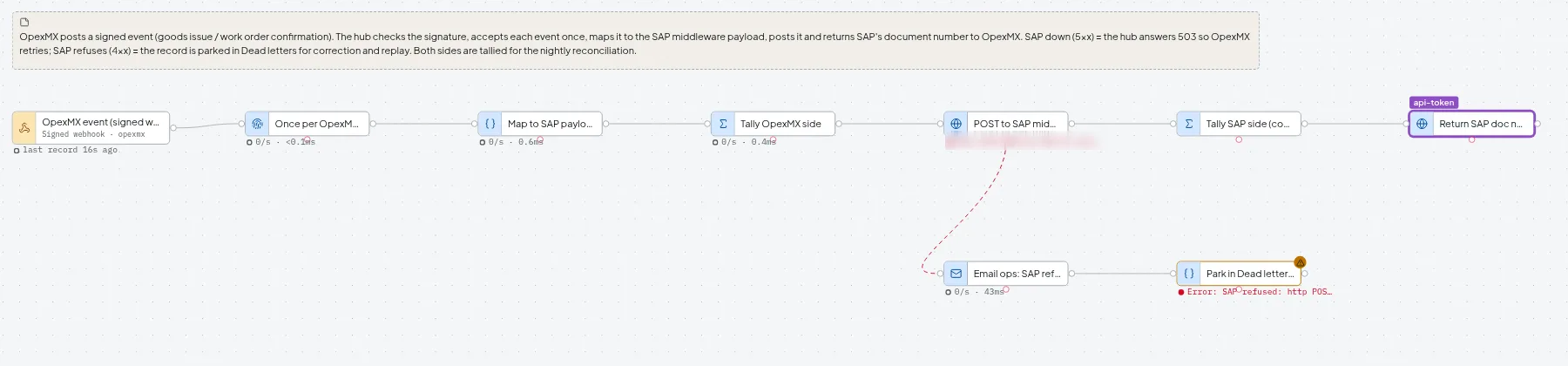
Nodes in the OpexMX to SAP flow, in order
- signed webhook
- dedupe
- map
- ledger: OpexMX
- http: SAP
- ledger: SAP
- http: ack to OpexMX
- reconcile
- Check the signature. A request that fails it is refused with 401 and never enters the flow.
- Accept each event id once. A resend of the same event id is recognised and dropped.
- Map the event to the SAP payload: a goods issue (movement type 261) or a PM order confirmation.
- Write the event to the ledger, OpexMX side.
- POST the payload to the SAP middleware with an Idempotency-Key header.
- Write SAP’s answer to the ledger, SAP side.
- Return the SAP document number to OpexMX, which stores it on the transaction.
Two failure paths are built in. If SAP refuses the posting (a 4xx answer), the record is parked in Dead letters with its original payload. If SAP is down (a 5xx answer), the hub answers the sender with 503 and records nothing, so the delivery can be sent again safely. OpexMX’s webhook sender today re-sends only after a network error or timeout, not after a 503, so sending again on a 5xx answer has to be enabled on the OpexMX side. A nightly reconcile at 01:00 compares the two ledgers and catches any delivery that never arrived.

Tested failure cases
The flow was run with five events, a resend and a forged request against a simulated SAP middleware, so the document numbers are not real SAP documents.
| Case | What happened | Result |
|---|---|---|
| Three normal events | Posted to SAP, which answered 201 | Document numbers returned to OpexMX |
| The same event sent again | Recognised by its event id | No second posting |
| A forged signature | Refused at the door | 401, nothing reached SAP |
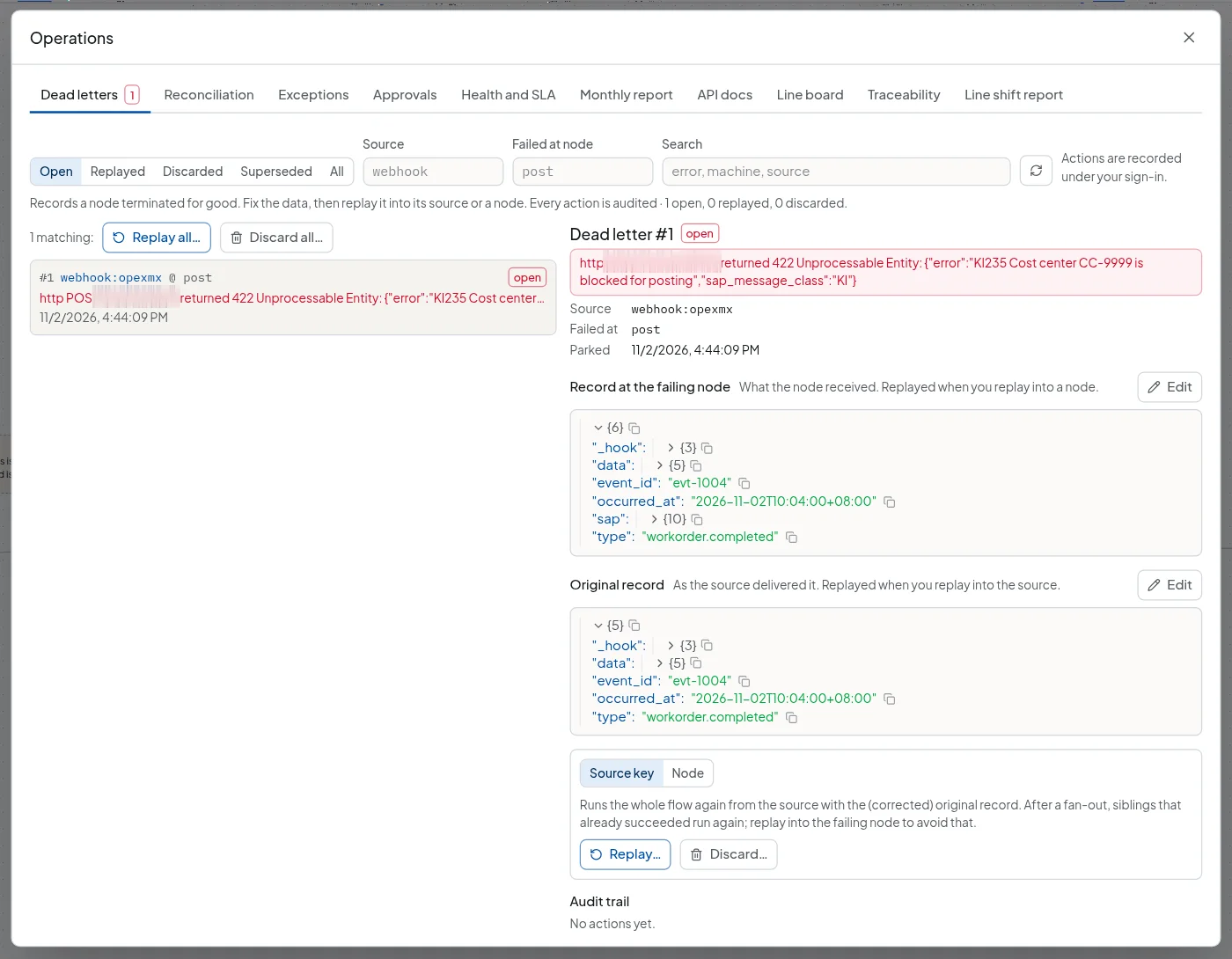
| SAP refuses a posting | SAP answered 422, “KI235 cost center blocked” | Parked in Dead letters with the original payload, editable, ready to replay |
| SAP is down | The hub answered the sender 503 twice | The test sender, standing in for OpexMX, sent again, and the posting went through when SAP came back |
The refused posting is the failure that usually goes unnoticed. It did not vanish and it did not block the others. It sits in Dead letters with the exact record that was sent and SAP’s message. Someone can correct the payload and replay it into the flow, and each action is recorded under their sign-in.
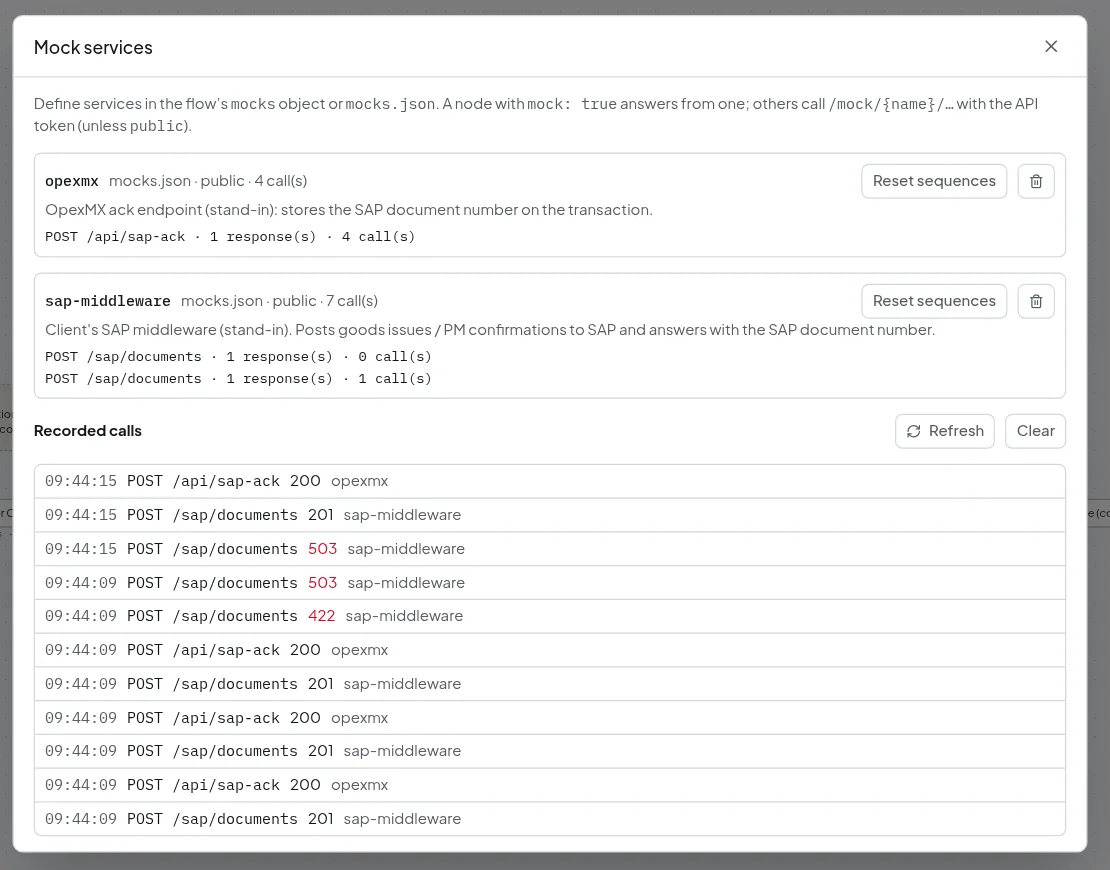
The call log of the stand-in service shows the sequence for the other cases: three postings accepted with 201, one 422, two 503 while SAP was down, then a 201 once it returned. Every accepted posting is followed by an acknowledgement call back to OpexMX with the document number.
The nightly check
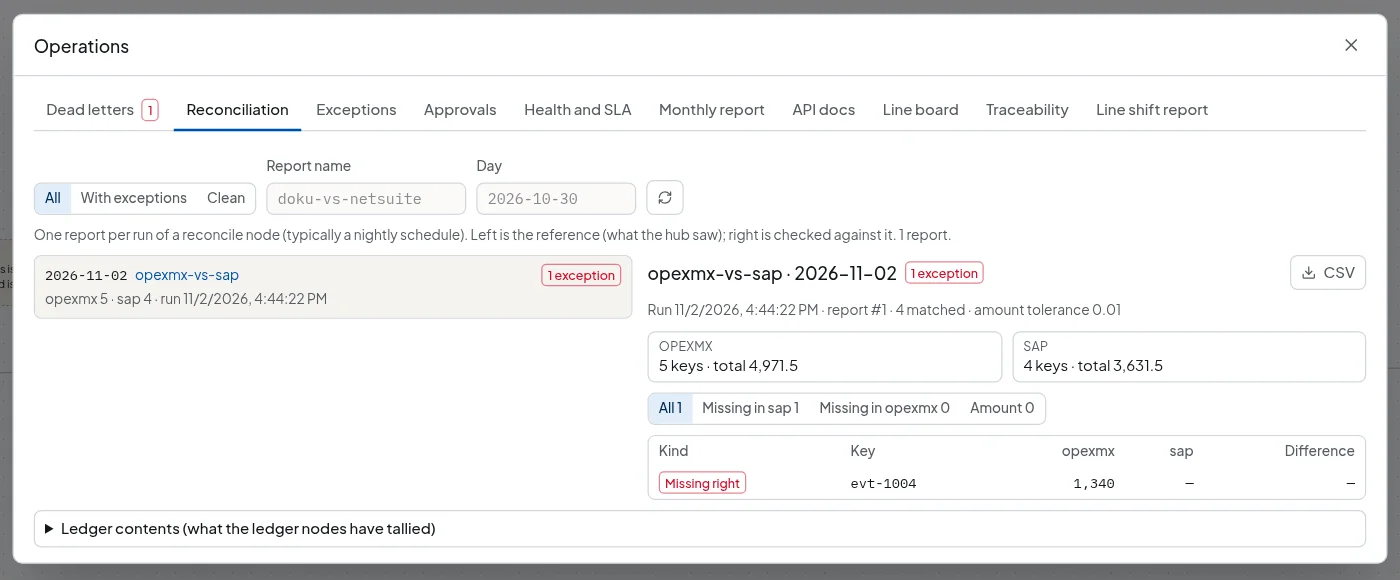
Every night at 01:00 a reconcile node compares the OpexMX ledger with the SAP ledger by event id. In the test run, OpexMX held 5 events totalling 4,971.50 and SAP held 4 totalling 3,631.50. Four matched. The one gap, event evt-1004 for 1,340, was the refused posting.
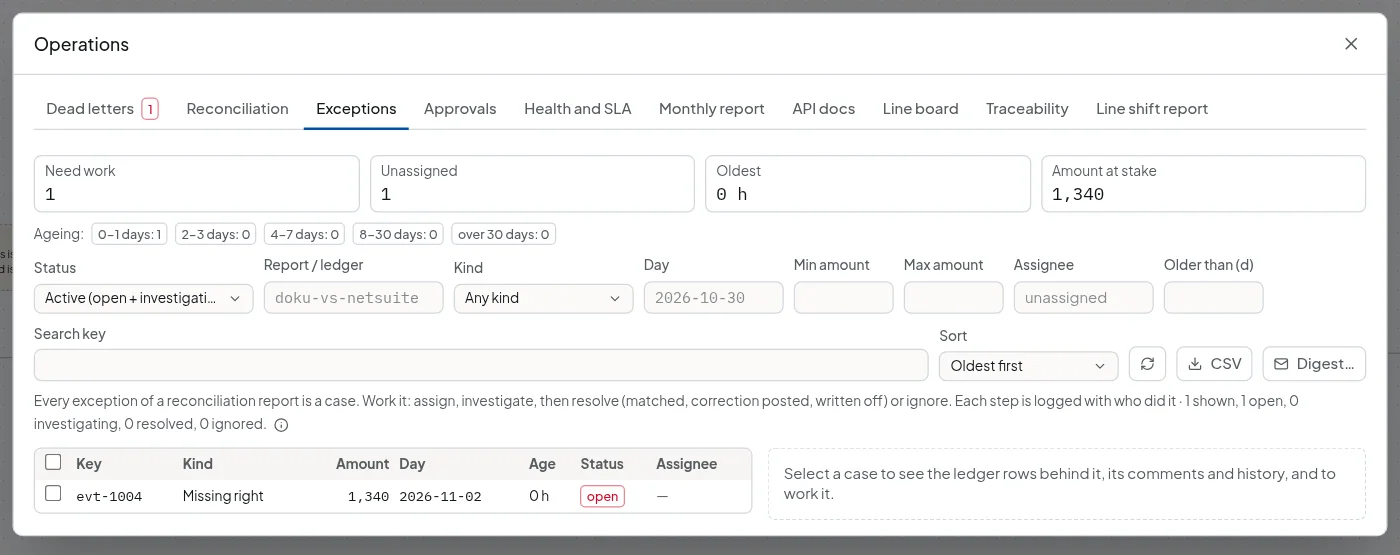
The gap became an exception case. A case has a status, an assignee and a history, so it is worked rather than read: assign it, investigate, then resolve it as matched, correction posted or written off. The dead letter tells you at once and the reconcile gives a second, independent view of the same posting. Here the two agree.
Health and alerts
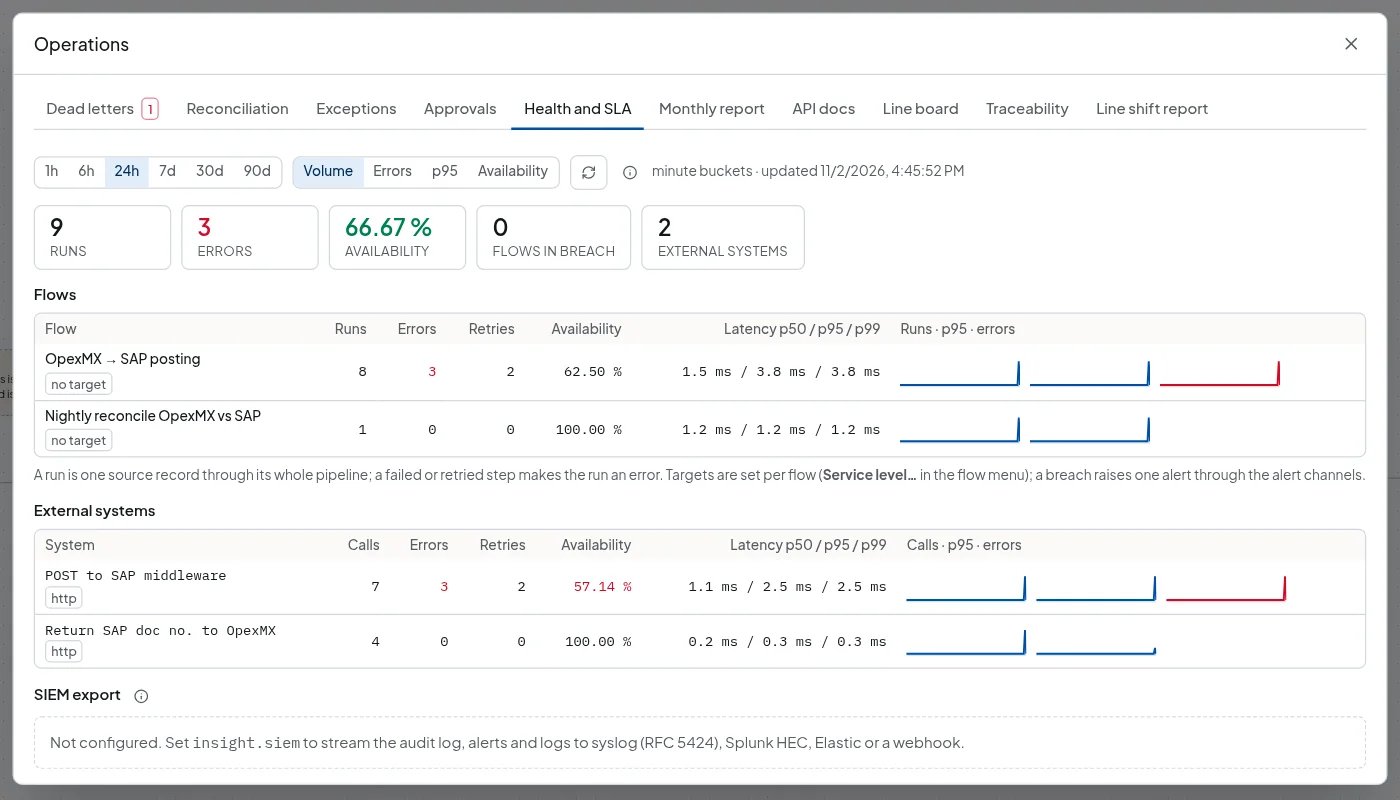
The Health and SLA tab lists every external call the flow makes, with calls, errors, retries and latency. In the test window the SAP call had 7 calls, 3 errors and 2 retries, which matches the 422 and the two 503 answers above.
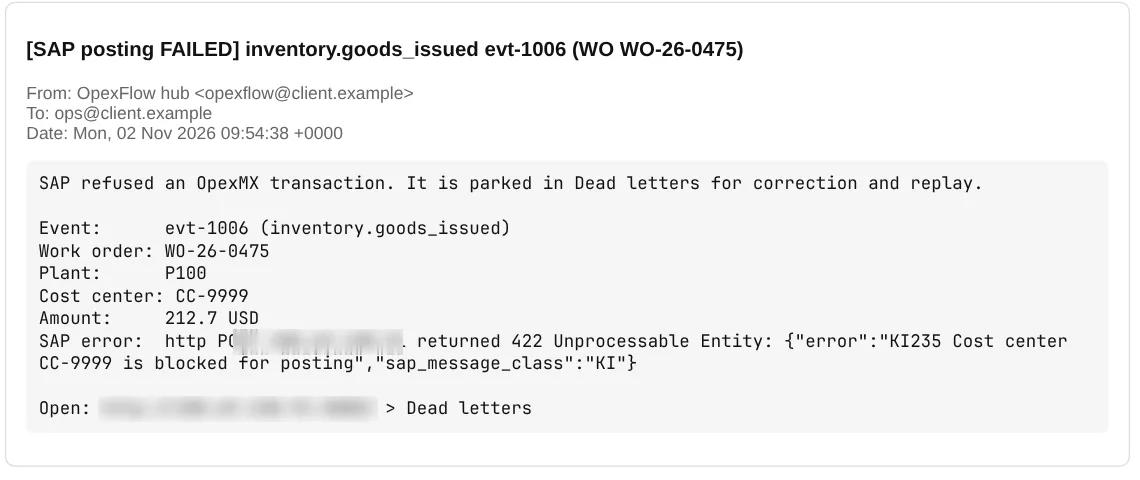
An email when SAP refuses a posting
The POST to SAP node sends permanent failures (4xx) down its error wire. That wire runs an email node, which sends the message over SMTP to the operations mailbox, and then a step that parks the record in Dead letters, so it can still be corrected and replayed. Transient failures (5xx) do not take this path. They go back to the sender as a 503, to be sent again.
Scope
- Tested against a simulated SAP middleware, not a live SAP system.
- The email in the screenshots went to a test mailbox.
- Field mapping, document types and the SAP interface (middleware REST, IDoc or BAPI) are set per installation.