OpexFlow next to Node-RED, Kepware, an iPaaS and app platforms.
What you build and what you buy with each, and where each one is the better choice. Node-RED comes first because most teams already know it.
Why not just Node-RED?
Node-RED is free, and for plenty of work it is the right tool. The license here pays for the jobs below, already built, tested and documented, so your team does not design them again for each integration.
| Job | With Node-RED | With OpexFlow |
|---|---|---|
| Accept a payment webhook | You write the signature check in a function node: the DOKU signature string, the timestamp window, replay handling. | Signed webhook source with DOKU, GlobalTix and HMAC-SHA256 schemes and an optional IP allowlist. A bad signature is rejected and counted, never routed. |
| Never post twice | You build a seen-keys store and get the order right: commit only after the posting succeeded. | Dedupe node. The key is committed after every sink accepted the record, and it survives a restart. |
| Survive an outage | Queue and retry are flows you design. Messages in flight live in the Node.js process. | Records are written to SQLite before the first send, delivered in order with backoff, and NATS input is acknowledged only after durable handling. |
| Repair a rejected record | A catch node, plus the storage and the screen to inspect, fix and resend what it caught. | Dead-letter queue: view the record, edit it, replay into the source or the failing node, discard. Each action is audited. |
| Post to NetSuite | The HTTP request node, plus token-based signing in a function node or a contributed node. | HTTP node with NetSuite token-based auth, NetSuite OAuth 2.0 M2M and OAuth 2.0 client credentials. Read-only and sandbox-only modes block writes to production. |
| Close the day for finance | You build the tallies, the schedule and the report. | Ledger and reconcile nodes on a schedule. One report per business day, with exceptions as CSV. |
| Test before you deploy | Deploy, then watch the debug sidebar on the live flow. | Test a node on the last real record, or dry-run a source. Nothing is sent. Validation rejects a bad flow before it goes live. |
| Drive a coding printer | Serial or TCP code for each vendor, or a community node where one exists. | Drivers for nine printer protocols, production lines, name maps and a job log. |
| Control who can change what | Login and project settings are yours to configure. Role checks, approvals and an audit trail of changes are yours to build. | OIDC single sign-on, four roles, named tokens, an append-only audit log and a two-person go-live sign-off for posting. |
Accept a payment webhook
- With Node-RED
- You write the signature check in a function node: the DOKU signature string, the timestamp window, replay handling.
- With OpexFlow
- Signed webhook source with DOKU, GlobalTix and HMAC-SHA256 schemes and an optional IP allowlist. A bad signature is rejected and counted, never routed.
Never post twice
- With Node-RED
- You build a seen-keys store and get the order right: commit only after the posting succeeded.
- With OpexFlow
- Dedupe node. The key is committed after every sink accepted the record, and it survives a restart.
Survive an outage
- With Node-RED
- Queue and retry are flows you design. Messages in flight live in the Node.js process.
- With OpexFlow
- Records are written to SQLite before the first send, delivered in order with backoff, and NATS input is acknowledged only after durable handling.
Repair a rejected record
- With Node-RED
- A catch node, plus the storage and the screen to inspect, fix and resend what it caught.
- With OpexFlow
- Dead-letter queue: view the record, edit it, replay into the source or the failing node, discard. Each action is audited.
Post to NetSuite
- With Node-RED
- The HTTP request node, plus token-based signing in a function node or a contributed node.
- With OpexFlow
- HTTP node with NetSuite token-based auth, NetSuite OAuth 2.0 M2M and OAuth 2.0 client credentials. Read-only and sandbox-only modes block writes to production.
Close the day for finance
- With Node-RED
- You build the tallies, the schedule and the report.
- With OpexFlow
- Ledger and reconcile nodes on a schedule. One report per business day, with exceptions as CSV.
Test before you deploy
- With Node-RED
- Deploy, then watch the debug sidebar on the live flow.
- With OpexFlow
- Test a node on the last real record, or dry-run a source. Nothing is sent. Validation rejects a bad flow before it goes live.
Drive a coding printer
- With Node-RED
- Serial or TCP code for each vendor, or a community node where one exists.
- With OpexFlow
- Drivers for nine printer protocols, production lines, name maps and a job log.
Control who can change what
- With Node-RED
- Login and project settings are yours to configure. Role checks, approvals and an audit trail of changes are yours to build.
- With OpexFlow
- OIDC single sign-on, four roles, named tokens, an append-only audit log and a two-person go-live sign-off for posting.
- Its editor is the reference. OpexFlow now matches quick add, link nodes and groups, and installs signed packages, but has no flow or global context store.
- It is free, and its community node library is far larger than our curated package catalogue. For home, building or general automation, use it.
- It has dashboards: Node-RED Dashboard 2.0 has its own widget set. OpexFlow Apps now cover dashboards with charts, multi-page navigation, forms and approval inboxes, but only for signed-in users: there are no public pages.
- It can run with per-user login and Git-backed projects, and its node library covers far more than industrial work. OpexFlow also has SSO, roles and Git export now, but with fewer integrations.
- If one developer owns the flows, a lost record is cheap and nobody audits the integration, the extra pieces in the table above may not be worth paying for.
The editor has Node-RED's everyday editing tools.
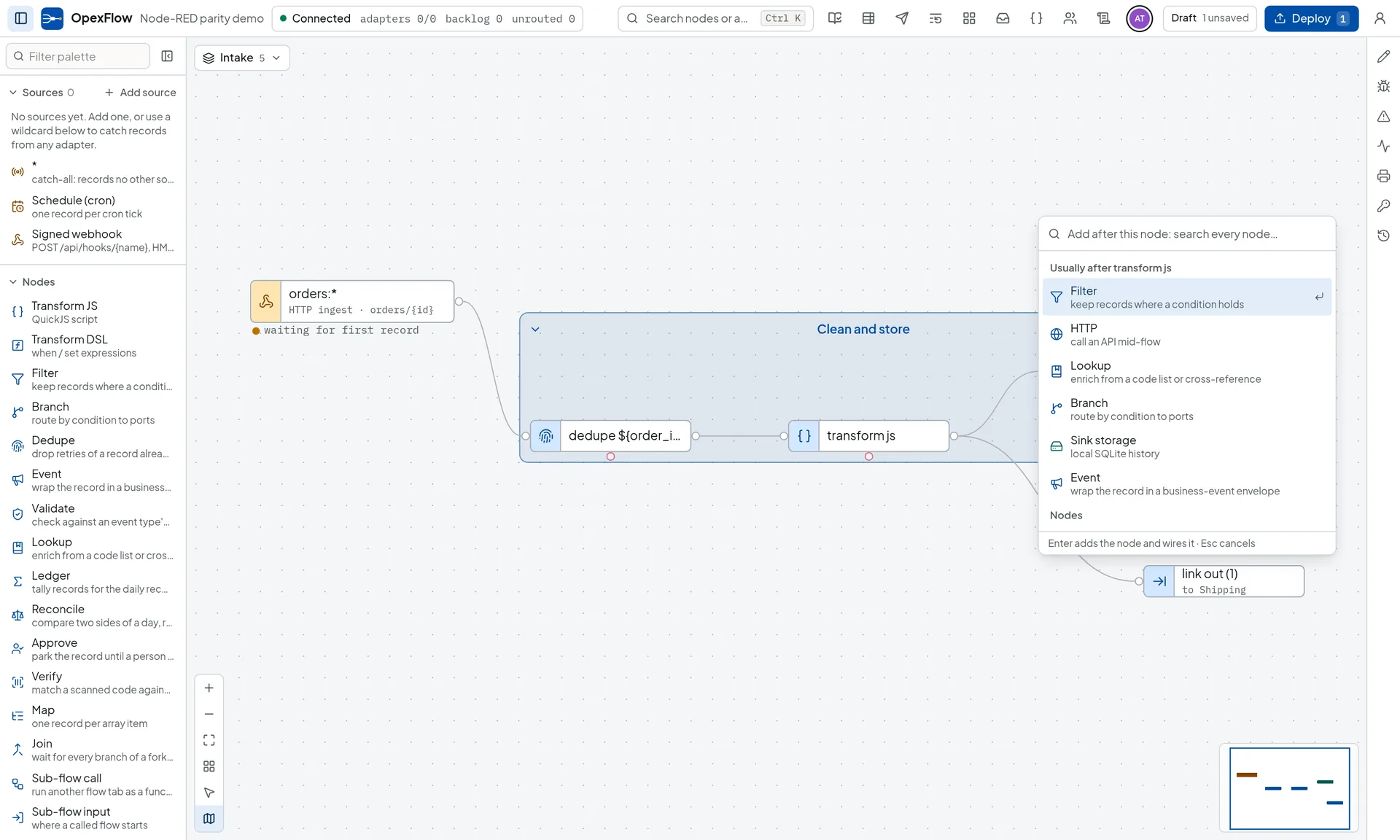
Quick add, link nodes across tabs, groups, wire splicing, align, find, snippets and a right-click menu are in the editor. If your team already edits flows in Node-RED, the moves carry over.
- Quick add
- Drag a wire off an output port and drop it on empty canvas, or double-click the canvas, or Ctrl+click. A search opens, ranked by what usually follows that node and port. Enter adds the node and wires it.
- Link out and link in
- Join flow tabs without a wire. A link compiles into an ordinary wire, so fan-out order, acknowledgement, error wires and traces hold across tabs. It is fire-and-forget, like Node-RED’s.
- Groups
- Ctrl+G puts the selection in a named, coloured box. Drag its title to move every node, fold it, or drop a node inside to add it. A group is a label and does not change how records flow.
- Wires and layout
- Drop a node on a wire to splice it in. Detach a node and keep it, or delete a node and keep the wire through it. Align and distribute from the selection bar.
- Find and reuse
- Ctrl+F searches names, types, ids and any setting on every tab. Snippets, copy and paste across tabs, a right-click menu and Export selected nodes are in too.
- No palette manager: the node set is built into the binary.
- No flow or global context store. Records are the state; use variables, lookup tables and the ledger.
- No link call node. A sub-flow call does that job.
- Snippets live in the browser that saved them. Export the library as a file to move it.
Against Kepware, and the stack you would assemble.
Install, protocols and licensing side by side. The protocols, the flow engine and the delivery queue are one file.
| Topic | OpexFlow | Node-RED | Kepware |
|---|---|---|---|
| What you install | One static executable with the editor embedded. No runtime, no package manager. | Node.js, then npm packages for the nodes you need. | A Windows server application. |
| Protocols | Modbus, EtherNet/IP, OPC-UA, FOCAS, MTConnect, MQTT, NATS, HTTP, Postgres, ClickHouse compiled in. AVEVA PI in an opt-in build. | Community palette nodes, each versioned and maintained on its own. | Drivers, licensed by driver and tag count. |
| Transforms | Native DSL for filters and field math; sandboxed JavaScript with a heap cap and a deadline for the rest. | Function nodes run JavaScript inside the same Node.js process. | Tag-level scaling and mapping, not a flow of transforms. |
| Delivery | Durable, ordered, signed push with retry, backoff and dead letters built in. | Queuing and retry are flows you build yourself. | Serves tags to clients that connect to it. |
| Licensing | Per node, or one flat license for unlimited sites and nodes. Never per tag. | Open source. | Commercial, by tag count. |
What you install
- OpexFlow
- One static executable with the editor embedded. No runtime, no package manager.
- Node-RED
- Node.js, then npm packages for the nodes you need.
- Kepware
- A Windows server application.
Protocols
- OpexFlow
- Modbus, EtherNet/IP, OPC-UA, FOCAS, MTConnect, MQTT, NATS, HTTP, Postgres, ClickHouse compiled in. AVEVA PI in an opt-in build.
- Node-RED
- Community palette nodes, each versioned and maintained on its own.
- Kepware
- Drivers, licensed by driver and tag count.
Transforms
- OpexFlow
- Native DSL for filters and field math; sandboxed JavaScript with a heap cap and a deadline for the rest.
- Node-RED
- Function nodes run JavaScript inside the same Node.js process.
- Kepware
- Tag-level scaling and mapping, not a flow of transforms.
Delivery
- OpexFlow
- Durable, ordered, signed push with retry, backoff and dead letters built in.
- Node-RED
- Queuing and retry are flows you build yourself.
- Kepware
- Serves tags to clients that connect to it.
Licensing
- OpexFlow
- Per node, or one flat license for unlimited sites and nodes. Never per tag.
- Node-RED
- Open source.
- Kepware
- Commercial, by tag count.
What it does not replaceOpexFlow reads OPC-UA by polling or by subscription, and serves its own tags over a built-in OPC-UA server that SCADA and MES clients can browse. That server is read-only: clients cannot write to machines through it. Reusable nodes come as signed packages from the OpexFlow catalogue or from a file, but the catalogue is small and curated, not a community library the size of Node-RED’s. Apps cover general screens (dashboards, charts, multi-page navigation, forms) for signed-in users; there are no public, signed-out apps.
Against an iPaaS.
An iPaaS is built for cloud systems talking to each other. OpexFlow is built for the host that sits next to the machines.
| Topic | OpexFlow | iPaaS |
|---|---|---|
| Where it runs | On a host you control, on the machine network, so a PLC or a printer is reached directly. Or hosted on a VPS behind a Cloudflare Tunnel, fed by plant edge nodes over an outbound-only signed link. | Most iPaaS products run in the vendor’s cloud, so a closed plant network needs an on-premises agent or an exposed endpoint. |
| What it connects | Modbus, EtherNet/IP, OPC-UA, FOCAS, MTConnect and coding printers, plus the ERP and payment APIs around them. | Connector catalogues centre on SaaS and business APIs. Machine protocols and printers are rarely in them. |
| What you pay for | Per node, or one flat license. Tag, flow and record counts do not change the price. | Commonly metered by tasks, runs or connectors, so the bill follows volume. |
Where it runs
- OpexFlow
- On a host you control, on the machine network, so a PLC or a printer is reached directly. Or hosted on a VPS behind a Cloudflare Tunnel, fed by plant edge nodes over an outbound-only signed link.
- iPaaS
- Most iPaaS products run in the vendor’s cloud, so a closed plant network needs an on-premises agent or an exposed endpoint.
What it connects
- OpexFlow
- Modbus, EtherNet/IP, OPC-UA, FOCAS, MTConnect and coding printers, plus the ERP and payment APIs around them.
- iPaaS
- Connector catalogues centre on SaaS and business APIs. Machine protocols and printers are rarely in them.
What you pay for
- OpexFlow
- Per node, or one flat license. Tag, flow and record counts do not change the price.
- iPaaS
- Commonly metered by tasks, runs or connectors, so the bill follows volume.
- If every system you connect is a cloud SaaS with a published connector and nothing sits on the plant floor, an iPaaS is the simpler choice.
- Its connector catalogue for SaaS products is far larger than ours. The OpexFlow package catalogue holds curated, signed packages, not hundreds of SaaS connectors.
- The two can sit side by side: OpexFlow delivers a signed HTTP push, so an iPaaS endpoint can be the receiver, and an iPaaS can call an OpexFlow signed webhook.
Apps and editing together.
Compared at the level of category. Retool and Mendix are general app platforms, so what is said about them comes from their own documentation. Read each product's current docs before you decide.
| Topic | OpexFlow | Retool and Mendix | Node-RED |
|---|---|---|---|
| What it is | JSON apps the connector’s dashboard renders at /apps/{slug}, over the data the connector already holds, calling flows for the logic. | General platforms for building applications. Mendix expresses logic as microflows, and Retool builds apps from queries and components. | Dashboard 2.0 adds dashboard widgets to the Node-RED editor and runtime. |
| Custom code | None in an app. Bindings are ${path} templates, and computation belongs in a flow. | In Retool, anything inside {{ }} is JavaScript. In Mendix, a microflow can call a Java action. | Function nodes and any Node.js code in the flow. |
| Changing a live app | Edit a draft, read the diff against the published app, publish. No build step, and users see it on their next request. | Each has its own build, versioning and deployment model. Check it against your own release process. | Deploy the flow that holds the dashboard. |
| Editing together | One shared draft, live cursors, deploys that name the co-authors. Text is merged per field. | Not compared here. Check the current docs for each product. | The admin API refuses a deploy built on an out-of-date revision with 409. The documentation describes no shared draft or presence in the editor. |
What it is
- OpexFlow
- JSON apps the connector’s dashboard renders at /apps/{slug}, over the data the connector already holds, calling flows for the logic.
- Retool and Mendix
- General platforms for building applications. Mendix expresses logic as microflows, and Retool builds apps from queries and components.
- Node-RED
- Dashboard 2.0 adds dashboard widgets to the Node-RED editor and runtime.
Custom code
- OpexFlow
- None in an app. Bindings are ${path} templates, and computation belongs in a flow.
- Retool and Mendix
- In Retool, anything inside {{ }} is JavaScript. In Mendix, a microflow can call a Java action.
- Node-RED
- Function nodes and any Node.js code in the flow.
Changing a live app
- OpexFlow
- Edit a draft, read the diff against the published app, publish. No build step, and users see it on their next request.
- Retool and Mendix
- Each has its own build, versioning and deployment model. Check it against your own release process.
- Node-RED
- Deploy the flow that holds the dashboard.
Editing together
- OpexFlow
- One shared draft, live cursors, deploys that name the co-authors. Text is merged per field.
- Retool and Mendix
- Not compared here. Check the current docs for each product.
- Node-RED
- The admin API refuses a deploy built on an out-of-date revision with 409. The documentation describes no shared draft or presence in the editor.
- If you need a general application platform, with custom logic in the app, many data sources or components of your own, use Retool or Mendix. OpexFlow Apps only render what the connector holds and have no custom code.
- If your dashboards live next to flows you already run in Node-RED, Dashboard 2.0 keeps them in one tool.
- OpexFlow Apps are for operator and finance screens on plant and integration data, with the roles and audit trail of the connector already around them.
Details: Apps and editing together.
Questions about the alternatives.
Something missing? Write to marketing@opexcg.com.
Is it a Node-RED alternative?
For industrial data flows and the business integration around them, yes. You get a canvas with Node-RED’s everyday editing tools (quick add, link nodes across tabs, groups), JavaScript transforms and an http node, and the protocols, printer drivers, idempotency and the delivery queue are built in instead of installed from a palette.
It is not a general automation tool. Its package catalogue is curated and small next to Node-RED’s community library, and apps are for signed-in users only. The compare page says where Node-RED is the better choice.
Is it a Kepware alternative?
It covers reading Modbus, EtherNet/IP, OPC-UA, FOCAS and MTConnect and routing the data onward, licensed per node instead of per tag.
It reads OPC-UA by polling or by subscription and serves the tags it collects over a built-in, read-only OPC-UA server, so SCADA and MES clients can browse them on the gateway. It does not let those clients write to machines through that server.
Node-RED and n8n are free. Why pay?
For a flow that one developer on your team owns and where a lost record is cheap, a free tool may be enough. Both give you a canvas and a node library.
You pay for the parts you would otherwise design, build, test and maintain around them: signature-checked intake, idempotency, durable ordered delivery, dead-letter repair and replay, reconciliation reports, tested deploys, printer drivers, and a vendor to call. Whether you can build those yourself is a question of time and skill, not of possibility. The license is per node, not per tag or per flow.
From download to first record in minutes.
Run one binary, connect a PLC, a CNC or a webhook, and watch the records arrive in the editor.
- One binary
- Raspberry Pi to rack server
- Signed delivery with retries
Sizing questions or an air-gapped install? Email marketing@opexcg.com or read the quick start.